Integrations
How-toShare a direct link
Send customers to your hosted booking page with a shareable URL, tagged with a source.
Updated Sep 30, 2026
Every booking form has a public URL that opens the form on a hosted page. Use it in email signatures, texts, and social bios, or anywhere you can't add a script.
URL format
https://book.servicereserve.com/form/<form-id>Copy your link
- 1
Open the form
Go to Booking Forms, open the form, and click the Share tab.
- 2
Add a source (optional)
In the Booking form URL card, enter a value in Source, for example
newsletter. The link updates to include?source=newsletter.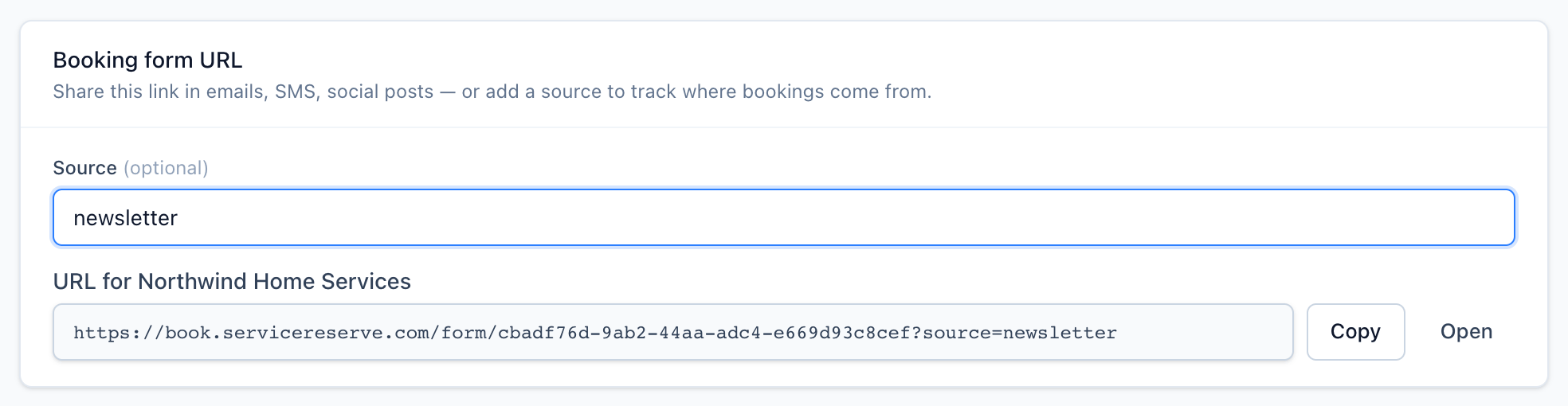
The link below Source updates as you type. - 3
Copy it
Click Copy. Click Open to try the link in a new tab.
Bookings made through a link with a source record that source. It shows on the request in your workspace.
Tracking parameters
You can add these to the URL:
Name
Type
Description
sourcestring
Source recorded on the booking. `ref` works the same way.
utm_*string
Any UTM parameter, for example `utm_source` or `utm_campaign`. Stored in the booking's attribution.
gclid, fbclid, …string
Ad click IDs are stored in the booking's attribution.
profileuuid
Business profile to attribute the booking to. The page header shows that location's details.
Example:
https://book.servicereserve.com/form/<form-id>?utm_source=email&utm_campaign=spring-promoRelated