Developer
APIAuthentication
Authenticate ServiceReserve API requests with a Bearer key issued from your workspace, and handle rate limits and errors.
Updated Sep 30, 2026
The ServiceReserve public API uses Bearer-token authentication. You issue keys from the API page under Integrations in your workspace (/api-keys).
Generating a key
- 1
Open the API page
In the sidebar, under Integrations, click Browse (or Manage), then click the API card. You can also open /api-keys directly.
- 2
Create the key
Click New API key, name it after the integration that will use it, then click Create key.
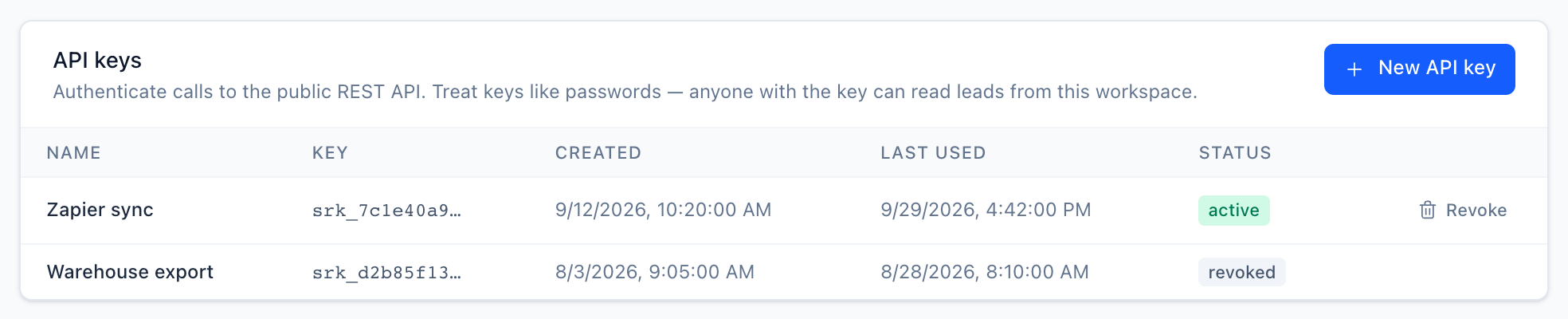
Each key shows its first 12 characters, when it was created and last used, and its status. - 3
Copy the key
Copy the raw key. It is shown once, so store it in your secret manager immediately. ServiceReserve keeps only a SHA-256 hash plus the first 12 characters for display.
Keys look like this: srk_ followed by 32 hex characters.
srk_a1b2c3d4e5f6a7b8c9d0e1f2a3b4c5d6The srk_ prefix lets secret scanners identify leaked keys.
Sending a request
The base URL is https://api.servicereserve.com. Pass the key in the
Authorization header:
curl https://api.servicereserve.com/api/v1/requests \
  -H "Authorization: Bearer $SERVICERESERVE_API_KEY"
Each key belongs to one workspace. Every response is scoped to that workspace.
Revocation
Revoke any key from the same page. It stops working on the next request. Each row shows Last used, so you can spot stale or abandoned keys before you rotate.
Rate limits
Each API key can make 1 request per second. A request over the
limit gets 429 Too Many Requests with these headers:
HTTP/1.1 429 Too Many Requests
Retry-After: 1
X-RateLimit-Limit: 1
X-RateLimit-Remaining: 0

{ "error": "rate_limited", "message": "Rate limit exceeded — retry in 1s." }
Retry-After is in whole seconds. Wait that long before you retry. For
batch syncs, sleep one second between requests. You can also give each
integration its own key, because the limit applies per key.
Error shape
Every error response has the same two fields:
{
  "error": "unauthorized",
  "message": "Provide a valid API key via Authorization: Bearer <key>."
}
error is a stable machine-readable code. message is for humans and
may change.
| Status | error | Meaning |
|---|---|---|
| 401 | unauthorized | Missing, malformed, unknown, or revoked key. The response also carries WWW-Authenticate: Bearer. |
| 404 | not_found | The resource doesn't exist or belongs to another workspace. |
| 429 | rate_limited | Over 1 request per second for this key. Honour Retry-After. |
| 500 | internal_server_error | Unexpected server error. Retry after a short backoff. |
Ids you pass in paths or as filters (id, form_id,
business_profile_id) must be valid UUIDs.
Related